
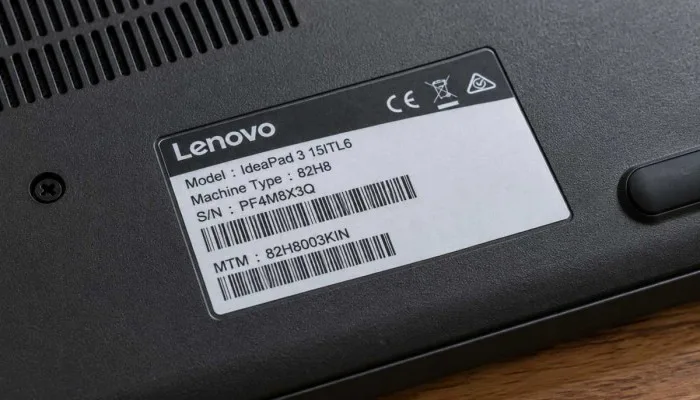
Your Lenovo laptop has a model number. But where? Most people have no idea. They need it for warranty for repairs for buying parts, for downloading drivers. Learning how to find my Lenovo laptop model number takes one minute. Just flip the laptop.
Look at the bottom sticker. It is right there. Sticker gone? No problem. Open Command Prompt. Type one line. Model appears. Need full specs? Go to Lenovo website. Enter serial number. Everything shows up. CPU. RAM. Storage. Warranty. Simple. No confusion. No technical talk. Just steps that work. Take a photo of your serial number. Save it. You will need it later trust me on this. Let me explain.
Why You Need Your Model Number?
Before we start, let me tell you why this matters.
- You need the model number for warranty claims. For repairs. For buying parts. For downloading drivers. For checking if your laptop supports a new software update. Without the model number, you cannot do any of this.
- The serial number is even more important. It is unique to your laptop. Two laptops with the same model name can have different parts. The serial number tells the exact build. So always keep it handy.
- Take a photo of the sticker on your laptop. Save it on your phone. Email it to yourself. You never know when you need it.
Read More: Lenovo Yoga Pro 9i Aura Edition Review and Buying Guide.
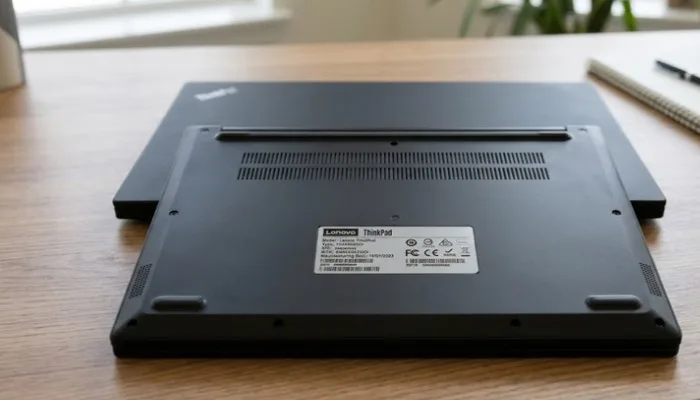
Check the Bottom Sticker
- This is the easiest way. Turn your laptop upside down. Look for a sticker. It has all the details. Model name. Serial number. Machine type. This is the fastest method. No need to turn on the laptop.
- The sticker shows a code. It starts with letters like PF, R3, R0, or S1. That is your serial number. The model name is also printed there.
- Some Lenovo laptops have the sticker under the battery. If your battery is removable, take it out. The sticker is inside. But most modern laptops have built-in batteries. So just check the bottom.
- If the sticker is worn out or faded, do not worry. There are other methods. Keep reading.
How to Find My Lenovo Laptop Model Number Windows 10?
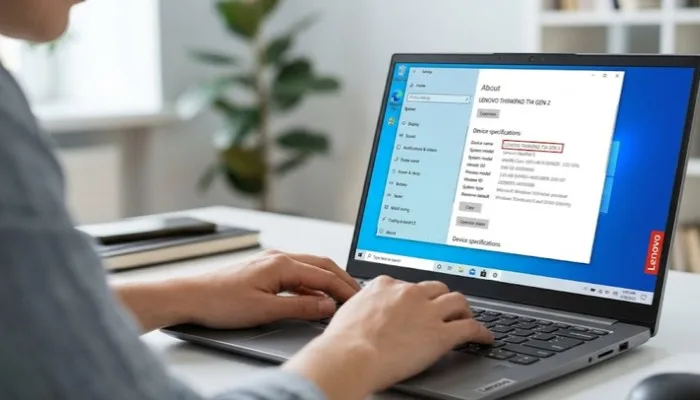
If you are using Windows 10, you can find the model inside the system. No sticker needed. No internet needed. Just your laptop.
Using Command Prompt
- Press Windows key + X at the same time
- Click Command Prompt from the menu
- Type this command:
wmic csproduct get name - Press Enter
Your model number will appear on the screen. Simple. Fast. Works on Windows 10 and Windows 11.
Using System Information
- Press Windows key + R to open Run
- Type
msinfo32and press Enter - A System Information window opens
- Look for "System Model" on the summary page
That is your laptop model. This method also shows your BIOS version, processor, RAM, and more.
For Serial Number
Type wmic bios get serialnumber in Command Prompt. Press Enter. Your serial number shows up. Write it down. You will need it later.
How to Find My Lenovo Laptop Model Number by Serial Number
You have the serial number. Now you want the model. Use Lenovo's official website.
Steps
- Go to Lenovo's support website
- Find the search box
- Type your serial number
- Click search
The result page shows your laptop details. Click on "Configuration and upgrade information". You will see the model, CPU, RAM, hard drive, graphics, screen size, and more.
This is the official Lenovo specification check. Very reliable. Works for all Lenovo laptops. Old and new.
Why Use Serial Number Instead of Model Number?
- Model number tells the series. Like "IdeaPad 3" or "ThinkPad T14". But many configurations exist under the same model name. Different RAM. Different storage. Different processors.
- Serial number tells the exact unit. So when you search by serial number, you get the exact specs of your laptop. Not a general list. This is important for buying parts. For downloading drivers. For warranty claims.
- Always use serial number when you need exact information.
Use Lenovo Vantage Software
Lenovo Vantage is a free app. It comes pre-installed on most Lenovo laptops. If you have it, this is the easiest software method.
Steps
- Open Lenovo Vantage
- Look at the home screen
- Your model and serial number are shown
That is it. Two seconds. No typing. No searching.
If not installed, download it from the Microsoft Store. It is free. It also helps with updates and system checks. Good to have anyway.
For Newer ThinkPads
Press Fn + N keys together. A window opens. It shows serial number, machine type, and BIOS info. This works on ThinkPad systems from 2024 or later. Very handy if you have a new ThinkPad.
Use Lenovo Quick Fix Tool
Lenovo has a small tool for this. It is called "Host Information Identification Tool". You can download it from Lenovo's support site.
Steps
- Download the tool from Lenovo's support site
- Run the .EXE file
- Click "Yes" if Windows asks for permission
- The tool shows your model and serial number
- Click "Copy" to save the details
This is good if you do not want to install Lenovo Vantage. The tool is small. Runs fast. Does not stay on your system. Simple.
You May Also Read: Best Lenovo Android Tablet Under 15000: Tab M10 Review and Guide
Use Lenovo PC Manager
Lenovo PC Manager is another free app. It is like Lenovo Vantage but for different regions. Some laptops come with PC Manager instead of Vantage.
Steps
- Download and install Lenovo PC Manager
- Open the app
- Wait a few seconds for it to detect your laptop
- Your model shows in the bottom left corner
Simple. Works well. Also helps with driver updates and system cleanup.
Lenovo Product ID Search by Serial Number
- Some people search for "product ID". Lenovo uses different terms. Serial number. Machine type. Model number. They are all connected.
- When you enter your serial number on Lenovo's website, you get everything. The model. The specs. The warranty. The parts list. That is your product ID search.
- If you need to buy parts, always use the serial number. Model number alone is not enough. Different models with the same name can have different parts. Serial number is unique to your laptop.
For example, two IdeaPad 3 laptops may look same. But one has Intel processor. Other has AMD. Parts are different. Serial number tells which one you have.
Lenovo Specification Check
You can check your laptop's full specs in two ways.
Online Method
Go to Lenovo support website. Enter serial number. Click "Configuration and upgrade information". You see CPU, RAM, storage, graphics, display, battery, and ports. Full details. Official source. Reliable.
On the Laptop
Open Lenovo Vantage. Go to Device > System Update. Or Device > Hardware Scan. It shows all specs. Also checks for driver updates. Useful for keeping your laptop running well.
You can also use free tools like CPU-Z or Speccy. These show detailed hardware info. But they do not show your Lenovo model number. So use Lenovo's tools first.
What if the Sticker is Gone?
Old laptops often lose their stickers. The glue dries. The sticker falls off. Or it fades from heat. Do not worry.
Use Command Prompt. That method does not need any sticker. Type the command. Get the model. It works even if the laptop is ten years old.
If Command Prompt does not work, try the BIOS. Restart your laptop. Press F2 or F1 or Delete during startup. The BIOS screen shows your model and serial number. Every laptop has this. No exceptions.
Quick Summary Table
| Method | What You Need | Best For |
|---|---|---|
| Bottom sticker | Nothing | Fastest way |
| Command Prompt | Windows laptop | No internet needed |
| Lenovo website | Serial number | Full specs and warranty |
| Lenovo Vantage | Installed app | Daily use |
| Quick Fix tool | Download | Quick check |
| Lenovo PC Manager | Download | Alternative to Vantage |
| BIOS | Restart | When sticker is gone |
Final Words
Finding your Lenovo laptop model is easy. Check the bottom sticker first. If it is worn out, use Command Prompt. If you need full specs, go to Lenovo's website with your serial number.
Write down your serial number somewhere safe. Take a photo of the sticker. You will need it for warranty claims, repairs, and buying parts. It saves time later.
The serial number is more important than the model number. Model tells the series. Serial tells the exact unit. Always use serial for support and parts. Simple right? Now go find your model number. It takes less than a minute and it saves you hours later.
FAQs
1. Where is the model number on a Lenovo laptop?
Turn laptop upside down. Look at the bottom. There is a sticker. It has model name, serial number, machine type. That is the fastest way. No need to turn on laptop. Some old laptops have it under the battery. Remove battery and check. But most new laptops have built-in battery. So just check the bottom sticker.
2. How to find model number without sticker?
Use Command Prompt. Press Windows key + X. Click Command Prompt. Type wmic csproduct get name. Press Enter. Model shows up. Works on Windows 10 and 11. No internet needed. No sticker needed. Even if laptop is ten years old, this works.
3. How to find serial number on Lenovo laptop?
Three ways. First, check bottom sticker. Serial number is printed there. Second, type wmic bios get serialnumber in Command Prompt. Third, open Lenovo Vantage app. It shows serial number on home screen. Write it down. You need it for warranty and repairs.
4. What is the difference between model number and serial number?
Model number tells the series. Like IdeaPad 3 or ThinkPad T14. Many laptops share same model name. Serial number is unique. It tells exact unit. Two laptops with same model name can have different parts. So always use serial number for buying parts or checking specs. Model number is not enough.
5. How to check Lenovo laptop specs online?
Go to Lenovo support website. Enter serial number in search box. Click search. Result page shows your laptop. Click Configuration and upgrade information. You see CPU, RAM, storage, graphics, display, battery, ports. Full details. Official source. Reliable. Works for all Lenovo laptops.
6. Does Lenovo Vantage show model number?
Yes. Open Lenovo Vantage. Look at home screen. Model and serial number are shown. If not installed, download from Microsoft Store. Free. Also helps with driver updates and system checks. Good to have anyway. For new ThinkPads, press Fn + N. Window opens with serial number and machine type.
7. What if Command Prompt does not work?
Try BIOS. Restart laptop. Press F2 or F1 or Delete during startup. BIOS screen shows model and serial number. Every laptop has this. No exceptions. Also try Lenovo Quick Fix tool. Download from Lenovo support site. Run it. It shows model and serial number. Click Copy to save.
8. Why do I need serial number for Lenovo product ID search?
Serial number is unique to your laptop. Model number is shared by many units. When you search by serial number on Lenovo website, you get exact specs. Exact warranty. Exact parts list. That is your product ID search. Model number alone gives general info. Not exact. So always use serial number for support and parts.